Each time a new contract is associated with a shop, an order number is assigned to it.
When a payment request is made, the payment gateway “filters” the contracts associated with the shop in order to identify the eligible contracts.
The contracts are filtered by technical criteria such as currency, supported payment methods, selected payment option, minimum and maximum amounts configured for the contract etc.
Once this filter is applied, the contacts/MIDs are listed in order of priority. The first contact on the list is then used for the payment.
If you would like to set the same priority for two (2) contracts so that the payment platform distributes payments equally among them, please contact sales administration.
If you have the rights to change the contract association within your shop, you can do this yourself.
- Sign in to your Merchant Back Office:
- Go to Settings > Shop, then select the shop for which the configuration must be changed.
- Click on the MID association tab to display the MIDs available for the shop.
- The Available Merchant ID (MID) section lists the available contracts of the company.

- The Associated Merchant ID (MID) section lists the contracts associated with the selected shop.

- The Available Merchant ID (MID) section lists the available contracts of the company.
- From the list of available contracts, select the 2 contracts between which you wish to split the payments by using the CTRL key on your keyboard.
- Click Equalize.
The
 symbol is displayed on both lines to indicate the split between contracts.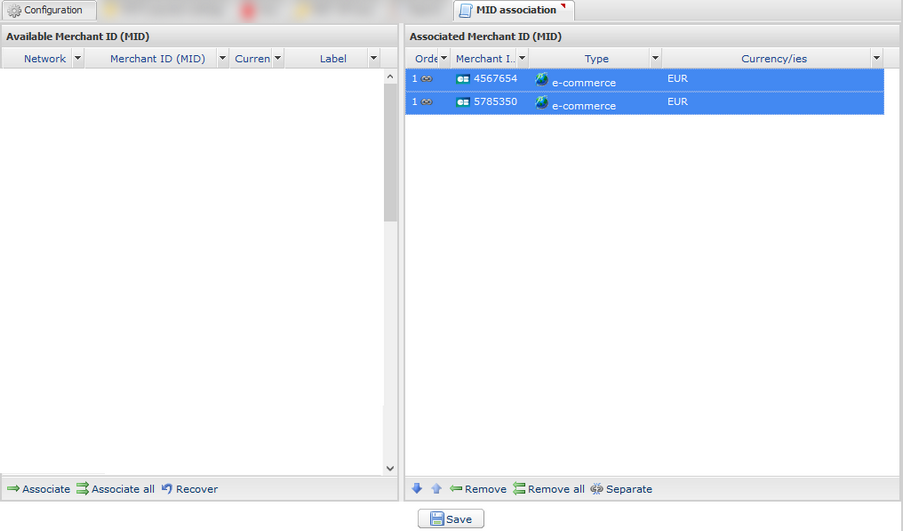
- Click the Save button to save the changes.